Hire a Dedicated Windows App Development Team from Argentina
If your company runs on the Microsoft ecosystem, you already know that a well-built desktop application can solve what a browser tab cannot: complex data workflows, offline access, native hardware integration and the security standards your IT department demands. That is exactly what we do.
From Cordoba, Argentina, we assemble teams of engineers specialized in WinUI 3, WPF and .NET MAUI who work in the same timezone bands as the United States and Western Europe. No 6 AM calls, no 12-hour waits for a reply: we are online when you are online. We speak fluent English, understand distributed team culture, and integrate with your processes as if we were part of your own company.
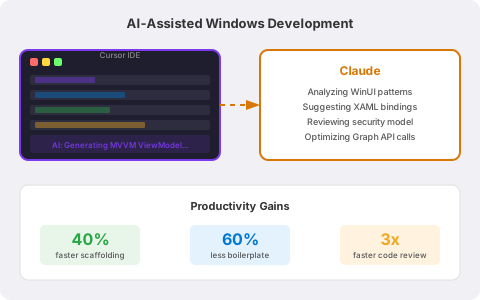
We also incorporate AI-assisted development using Cursor IDE and Claude to accelerate ViewModel generation, XAML bindings, unit tests and code reviews. Every AI suggestion goes through human review and automated testing before reaching production.
- WinUI 3, WPF, UWP and .NET MAUI with MVVM architecture and testable modules
- Azure AD (Entra ID), Microsoft Graph, Office add-ins, secure MSIX distribution
- CI/CD with GitHub Actions or Azure DevOps, staged rollouts and observability
- AI-assisted development with Cursor and Claude for faster delivery without sacrificing quality
Why a Windows desktop app is still the right choice for many businesses
There is a conversation that happens in almost every project: "Could we build this as a web app?" Sometimes the answer is yes. But when the workflow involves large data volumes, deep OS-level integrations, industrial peripheral access, or the need to function without a stable internet connection, a native Windows desktop application still wins.
Windows remains the operating system that powers the majority of enterprise desktops worldwide. According to StatCounter, it holds over 70% desktop market share. And that is not a coincidence: the integration with Microsoft 365, Azure and corporate identity infrastructure has no equivalent on other platforms.
- Native performance: direct access to Windows APIs for data-intensive operations, graphics and hardware.
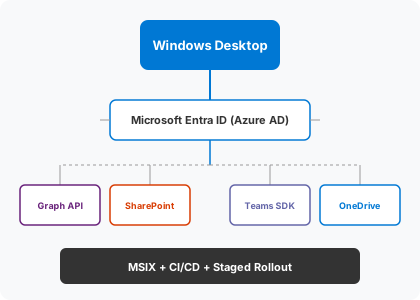
- Microsoft ecosystem integration: Single Sign-On with Azure AD, synchronization with SharePoint, OneDrive and Teams through Graph API.
- Offline capabilities: local data caching, automatic sync when connectivity returns. Essential for field operations and industrial plants.
- Enterprise-grade security: controlled distribution via Intune, Group Policy, private stores and mandatory code signing.
- Advanced UX: interface patterns that web apps still cannot match for data-heavy workflows, editable grids, or real-time dashboards.
We are not against web apps. In fact, we also do web development. But we know how to identify when a desktop client is the right tool, and when forcing a web app would end up costing more in time, frustration and support tickets.
Windows App Development Services
From initial concept to production maintenance.
WinUI 3, WPF and .NET MAUI Development
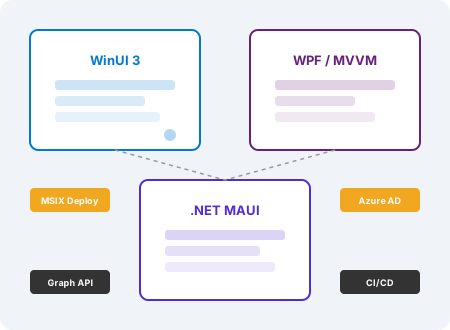
We build native desktop interfaces with Microsoft's current frameworks. WinUI 3 for new projects targeting Windows 10 and 11 with Fluent Design. WPF for existing applications that need gradual modernization. .NET MAUI when the same code needs to run on Windows, Android, iOS and macOS. Always with MVVM architecture, dependency injection and testable modules.
Microsoft Ecosystem Integrations
Azure AD (Entra ID) for authentication with Single Sign-On. Microsoft Graph for accessing calendars, emails, files and user profiles. Office add-ins for Word, Excel and Outlook. Connectors for SharePoint, OneDrive and Teams. All with least-privilege access, secure storage and compliance with your IT policies.
MSIX Packaging and Enterprise Distribution
We package with MSIX, digitally sign the code and configure auto-update flows. Distribution can go through Microsoft Intune, Endpoint Manager, organizational private stores or offline installers for air-gapped networks. Everything is documented so your IT team can operate independently.
Quality, Testing and Observability
Unit tests, integration tests and automated UI tests. Crash reporting with App Center or Sentry. Anonymized telemetry to understand how users actually use the application. Health checks and dashboards your team can monitor. Every build passes automated tests on representative Windows versions before reaching production.
Security by Design
Executable hardening, code signing, secure credential storage with DPAPI, encrypted communications and SOC 2-aligned practices. Least-privilege principles from the first line of code. Periodic security audits and dependency review with tools like dotnet audit.
CI/CD for Desktop Applications
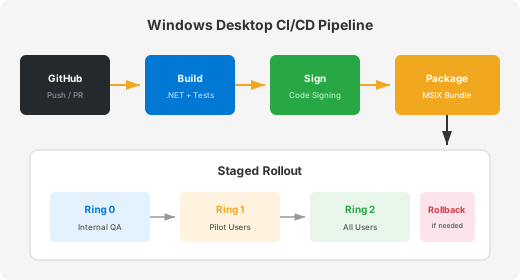
GitHub Actions or Azure DevOps pipelines that build, sign, package and publish automatically. Staged rollouts with rings (internal QA, pilot users, general production) and tested rollback plans. No more manual builds or "works on my machine": everything is traceable, repeatable and auditable.
Whether you need a new application from scratch or to modernize a legacy WPF/WinForms system, we align with your IT policies and deliver maintainable software your team can own. If you also need Android, cross-platform or .NET backend, we coordinate everything under a single roadmap.
AI-accelerated development: how we use Cursor and Claude on Windows projects
In 2026, software development changed. The term "vibe coding", coined by Andrej Karpathy in early 2025, describes a workflow where you explain what you need to AI and it generates the code. Collins Dictionary named it Word of the Year 2025. Today, over 80% of developers already use or plan to use AI-assisted coding tools.
We adopted this approach with discipline. We use Cursor IDE (the VS Code-based IDE that reached a $9.2 billion valuation in 2025) together with Claude from Anthropic to:
- Generate ViewModels and XAML bindings from functional descriptions, reducing boilerplate by 60%.
- Write unit tests for business logic, validations and services, accelerating test coverage.
- Review code and detect problematic patterns before they reach a pull request.
- Document internal APIs and generate deployment playbooks consistently.
But there is an important nuance: AI does not replace the engineer. Every suggestion goes through human review, every change runs the automated test suite, and architecture decisions are made by the team. We use AI as an accelerator, not as autopilot. That is the difference between reckless "vibe coding" and AI-assisted development with professional judgment.
Companies like Box reported a 30-50% increase in product throughput and migrations that were 80-90% faster after adopting Cursor as their primary IDE. We see similar results across our Windows projects.
Case study: operations desk modernization for a grain exporter
The problem
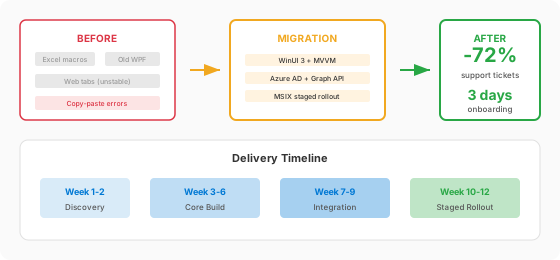
An agribusiness company with offices in Rosario, Argentina and trading operations abroad had a problem any IT team would recognize: three separate tools doing the same job. Grain desk operators used Excel macros to calculate prices, an old WPF application to log contracts, and a web tab that crashed whenever the internet connection degraded. The result was copy-paste errors between tools, inconsistent data and operators who took weeks to learn the full workflow.
The solution
We built a unified desktop application with WinUI 3 that replaced all three tools. The design follows Microsoft's Fluent Design system, with role-based views: operators see prices and contracts, supervisors see volume dashboards, and administration sees consolidated reports.
We implemented offline-first caching so the application keeps working when the VPN drops or connectivity is unstable. Data syncs automatically when the connection returns. Authentication runs through Azure AD (Entra ID), and contract documents link directly from SharePoint via Microsoft Graph.
Releases ship as MSIX packages with a ring-based scheme: pilot users in Argentina first, then the trading team abroad. If something goes wrong, rollback is immediate.
The results
- 72% fewer support tickets related to crashes and data errors within the first two release cycles.
- 3-day onboarding for new operators (previously took 2-3 weeks).
- Zero data inconsistency incidents since eliminating copy-paste between tools.
- The IT team handles distribution and updates without external support.
This is the kind of project we enjoy most: messy reality, clear metrics, and a Windows stack that makes sense because the business lives in Microsoft 365.
Our Windows technology stack
We do not choose technologies for trends. Every tool in our stack is there because it solves a specific problem and has active support from Microsoft or a strong community.
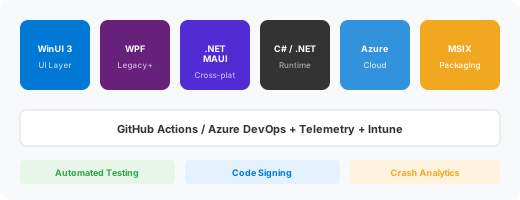
- UI Frameworks: WinUI 3 (Microsoft's recommendation for new projects), WPF (for modernizing existing apps), .NET MAUI (cross-platform with C#).
- Language and runtime: C# with .NET 8/9, CommunityToolkit MVVM Toolkit.
- Identity and security: Azure AD (Entra ID), MSAL, Microsoft Graph, DPAPI for secure local storage.
- Packaging: MSIX with code signing, auto-updates, distribution via Intune or private stores.
- CI/CD: GitHub Actions or Azure DevOps with automated builds, signing and staged deployment.
- Testing: xUnit, NUnit, WinAppDriver for UI automation, App Center for crash reporting.
- AI-assisted: Cursor IDE + Claude for code generation, testing and accelerated code review.
Useful references: Windows App SDK on Microsoft Learn and the Windows Community Toolkit on GitHub.
How we deliver reliable Windows applications
Our process is designed so software reaches production without surprises and so your team can operate it without depending on us indefinitely.
- Discovery and architecture: we understand the business context, IT constraints, target Windows versions and security requirements before writing a single line of code.
- Reusable component design: design systems, shared MVVM controls and consistent visual themes to accelerate feature development.
- Iterative development with AI: short sprints with partial deliveries, using Cursor + Claude to reduce boilerplate and accelerate testing.
- Performance budgets: from day one we measure startup time, memory usage, UI responsiveness and crash rate.
- Packaging and distribution: signed MSIX, auto-update flows and rollback playbooks your IT team can execute.
- Handoff and maintenance: documentation, runbooks, telemetry dashboards and ongoing support plans.
Windows development FAQs
OUR STANDARDS
Stable releases, predictable operations.
For every Windows project we measure what actually matters: application startup time, memory footprint, UI responsiveness and crash rate. Every build passes automated tests on representative Windows versions before advancing to the next pipeline stage.
Before each release we verify the digital signature, MSIX packaging, upgrade paths and rollback plans. Telemetry dashboards and operational runbooks ship with the application, so your IT team can operate confidently from day one.
If you are evaluating options, you may also want to check our C# development teams, Xamarin and .NET MAUI services, or C# developer staff augmentation.
Contact Siblings Software Argentina
Get in touch and build your idea today.